Curation Format/Logo: Difference between revisions
Jump to navigation
Jump to search
Created page with "Logos must be in PNG format. A good logo shows something that is representative of the game, like the game's main characters (from the title screen, for example) or other prom..." |
mNo edit summary |
||
| Line 17: | Line 17: | ||
</gallery> | </gallery> | ||
<noinclude> | |||
[[Category:Curation Guides]] | |||
</noinclude> | |||
Revision as of 03:58, 2 January 2022
Logos must be in PNG format. A good logo shows something that is representative of the game, like the game's main characters (from the title screen, for example) or other prominent art. You can also use the entire title of the game, preferably including a visual element along with it. The file must be named logo.png and placed in your curation folder. You can add a logo to a curation in Flashpoint Core by dragging it on to the left panel above Drop an image here to add it.
Recommended tools for grabbing logos include Snip & Sketch and Paint, both included in Windows 10/11 by default. You're free to use other tools, but remember, always save logos in PNG format. When possible, it is preferable to make logos more or less square-shaped.
Examples
-
 Bad example, has bad aspect ratio.
 -
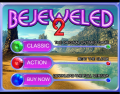 Bad example, contains gameplay options and buttons. Crop it down to just the logo.
 -
 Acceptable example. Menu options are cropped out, but the logo is not square-shaped.
 -
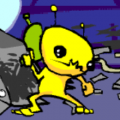 Acceptable example. It is preferable to use higher quality art from the game.
 -
 Good example. This is a decent shot of the focal point of the game, taken from the title screen.
 -
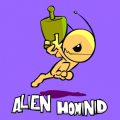 Great example. Shows off both the artist's work and the title, but no menu options or other things to get in the way. It is also square-shaped.
 -
 Good example. Logo is sufficiently cropped and has acceptable dimensions.
 -
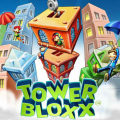 Great example. Logo has both the title and the artwork.


