Curation Format/Screenshot: Difference between revisions
No edit summary |
(Added warning about not using screenshots from websites/videos) |
||
| Line 1: | Line 1: | ||
Screenshots must be in PNG format. A good screenshot is a credible 'action shot' of the game (no menus or obvious tutorials). It can be found in the curation folder as <code>ss.png</code>. You can add a screenshot to a curation in the Curate tab by dragging it on to the right panel above ''Drop an image here to add it'', or clicking ''Add Screenshot''. | Screenshots must be in PNG format. A good screenshot is a credible 'action shot' of the game (no menus or obvious tutorials). It can be found in the curation folder as <code>ss.png</code>. You can add a screenshot to a curation in the Curate tab by dragging it on to the right panel above ''Drop an image here to add it'', or clicking ''Add Screenshot''. | ||
Recommended tools for grabbing screenshots include Snip & Sketch and Paint, both included in Windows 10/11 by default. You're free to use other tools, but remember, always save screenshots in PNG format. | Recommended tools for grabbing screenshots include Snip & Sketch and Paint, both included in Windows 10/11 by default. You're free to use other tools, but remember, always save screenshots in PNG format. Your screenshot should be your own. Do not take a screenshot from a website or YouTube video. | ||
'''Examples:''' | '''Examples:''' | ||
Latest revision as of 06:52, 10 January 2026
Screenshots must be in PNG format. A good screenshot is a credible 'action shot' of the game (no menus or obvious tutorials). It can be found in the curation folder as ss.png. You can add a screenshot to a curation in the Curate tab by dragging it on to the right panel above Drop an image here to add it, or clicking Add Screenshot.
Recommended tools for grabbing screenshots include Snip & Sketch and Paint, both included in Windows 10/11 by default. You're free to use other tools, but remember, always save screenshots in PNG format. Your screenshot should be your own. Do not take a screenshot from a website or YouTube video.
Examples:
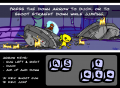
Bad example. Don't show obvious tutorials.
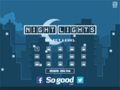
Bad example. Don't show menus, unless the entire point of the game is menus. Work your way to a battle in an RPG or strategy game.
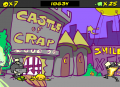
Good example. Shows some action. Dying is sometimes unavoidable - don't feel bad if the screenshot is otherwise good.
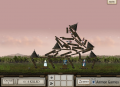
Great example. Shows a lot of action and what the game's big draw is.


