Linux Support and Mac Support: Difference between pages
No edit summary |
(Added Flash Player settings popup workaround) |
||
| Line 1: | Line 1: | ||
Flashpoint's Mac support is heavily experimental. This page provides information about the current Flashpoint for Mac package. | |||
Please join our Discord and provide your feedback in the <code>#flashpoint-mac-linux-help</code> channel: http://discord.gg/S9uJ794 | |||
== Latest Package == | |||
'''Download Beta 2019-12-15:''' | |||
http://bluepload.unstable.life/flashpointinfinityformacbeta2019-12-15.zip | |||
'''Changelog:''' | |||
2019-12-15: Added <code>"wmode":"direct"</code> to the default SWFObject parameters. This fixes certain 3D Flash games which previously did not work properly. | |||
2019-12-14: First beta available! | |||
== Installation Instructions == | |||
# Download and unzip the latest package using the link above. | |||
# Double-click <code>StartFlashpoint.command</code> to open Flashpoint. | |||
#* '''Do not forget this step! You must use <code>StartFlashpoint.command</code>, otherwise Flashpoint will not work properly.''' | |||
== Troubleshooting == | === Troubleshooting === | ||
If Flashpoint does not work after installation, follow the steps below: | |||
# Click the Apple menu and open System Preferences. | |||
# Click "Security & Privacy," then click the "Privacy" tab. | |||
# Click "Full Disk Access". | |||
# Click the lock icon and enter your password to make changes. Then click the + button under the list of apps to add Terminal to the list. | |||
# Click the lock icon again to save your changes. You should see Terminal in the list of allowed apps, as shown below. <br> [[File:FullDiskAccess.png|500px]] | |||
If the Flash Player | ==== Flash EOL Screen ==== | ||
If you see the Flash Player EOL information screen when you try to play a game, that means that SeaMonkey is loading your installed Flash Player plugin instead of the plugin that is bundled with Flashpoint. To fix the problem, [https://helpx.adobe.com/flash-player/kb/uninstall-flash-player-mac-os.html uninstall Flash Player from your Mac] and restart Flashpoint. Games should work again in SeaMonkey. | |||
==== Flash Player Settings Popup ==== | |||
When you try to play a game, you might get a storage permissions popup like the one below: | |||
[[File:FlashSettingsPopup.png|300px]] | |||
If you are unable to close this window, follow these steps to solve the problem: | |||
# Quit SeaMonkey if it is open (SeaMonkey -> Quit SeaMonkey from the top menu bar) | |||
# Open Flashpoint Infinity's FPSoftware folder, then find and open "SeaMonkey.app". | |||
# Copy and paste this URL into SeaMonkey's address bar: <code>https://www.macromedia.com/support/documentation/en/flashplayer/help/settings_manager03.html</code> | |||
# You should see the Flash Player Settings Manager. Drag the bar all the way to the right to allow Flash to store "Unlimited" data. (Don't worry, Flashpoint games won't store more than a few MB of data.) | |||
# Quit SeaMonkey (SeaMonkey -> Quit SeaMonkey from the top menu bar). | |||
# Open Flashpoint again. The problem should be fixed. | |||
Flashpoint | === MacOS Catalina (10.15) and later === | ||
Because Flashpoint's applications are from an "unidentified developer," if you're using Catalina or later, you'll need to approve each application before it can run. Open your system preferences, click "Security & Privacy", then allow each of the following applications to run: StartFlashpoint.command, Flashpoint Launcher, swfbbox, and SeaMonkey. If you have trouble figuring out how to do this, [https://www.youtube.com/watch?v=WiYmUXVOlgI watch this tutorial video]. | |||
Because Adobe Director Projectors are 32-bit applications, [[SPR for Mac]] will not work on MacOS Catalina or later. This means that Flashpoint for Mac does not support Shockwave games on Catalina or later versions of MacOS. | |||
=== | === MacOS Big Sur (11.0) and later === | ||
Flash applications have been successfully tested and are working. To use Flashpoint with Big Sur and later versions, a few modifications are required. Follow the steps below: | |||
# Download SeaMonkey 2.53.4 for MacOS x64 from [https://www.seamonkey-project.org/releases/2.53.4 here]. After the file finishes downloading, open it and copy the "SeaMonkey.app" file somewhere that you'll remember. | |||
#* '''Make sure you download the correct version; 2.53.4 is the only SeaMonkey version that will work with Flashpoint!''' | |||
# Open Flashpoint Infinity's FPSoftware folder, then find the old "SeaMonkey.app" there. | |||
# Right-click the old SeaMonkey.app and click "Show Package Contents." | |||
# Open the <code>Contents</code> folder, then within that folder, open the <code>Resources</code> folder. | |||
# Find the folder called <code>plugins</code> and ''copy'' it. | |||
# Find the new "SeaMonkey.app" file that you downloaded in Step 1. Right-click it and click "Show Package Contents." | |||
# Open the <code>Contents</code> folder, then within that folder, open the <code>Resources</code> folder. | |||
# ''Paste'' in the <code>plugins</code> folder that you copied earlier. | |||
# Go back outside of the new "SeaMonkey.app" package and ''copy'' it. | |||
# Open Flashpoint Infinity's FPSoftware folder, then ''paste'' the "SeaMonkey.app" file that you just copied. Replace the original file when prompted. | |||
=== | === MacOS Monterey (12.0) === | ||
MacOS Monterey no longer ships with PHP, so you will need to manually install PHP 7.4. The instructions for doing so are below, but are currently untested. If you try them, please join our Discord server and let us know whether the instructions worked for you. | |||
First, open the terminal and follow [http://osxdaily.com/2018/03/07/how-install-homebrew-mac-os/ these instructions] to install Homebrew. Keep the terminal open and run these commands in order: | |||
brew tap shivammathur/php | |||
brew install shivammathur/php/[email protected] | |||
brew link --overwrite --force php@7.4 | |||
For more information about installing PHP on MacOS Monterey, see [https://wpbeaches.com/updating-to-php-versions-7-4-and-8-on-macos-12-monterey/ this article]. | |||
=== Apple Silicon Macs === | |||
To run Flashpoint on Macs with the new M1 chip, you'll need to install Rosetta by following [https://osxdaily.com/2020/12/04/how-install-rosetta-2-apple-silicon-mac/ these instructions]. Once you've done that, follow the instructions in the previous sections to get Flashpoint working. | |||
=== Installing Java === | |||
To add support for Java games, you'll need to install the Java Development Kit. Follow the steps below: | |||
# Download JDK version 8u212 from here: https://github.com/frekele/oracle-java/releases/download/8u212-b10/jdk-8u212-macosx-x64.dmg | |||
# Open the DMG file and run the installer. Follow the on-screen instructions to install the JDK. | |||
=== Installing Wine === | |||
Running games in Wine is not yet supported, but we hope to add support for this in a future build. If you'd like to contribute to our efforts, you can learn more about installing Wine on MacOS from [https://github.com/Gcenx/wine-on-mac here]. | |||
=== | === Using Flashpoint with Automator (optional) === | ||
You can start Flashpoint without having to click on <code>StartFlashpoint.command</code> by using Automator using the below steps: | |||
# Choose File > New. | |||
# Select "Application", then click Choose. | |||
# Drag the Run Shell Script action into your workflow. | |||
# Enter <code>open /Users/[YOUR USERNAME HERE]/Downloads/Flashpoint\ Infinity\ for\ Mac\ Beta/StartFlashpoint.command</code> in the command field. | |||
== Technologies == | |||
Currently, only Flashpoint Infinity is available for Mac. However, it should be fairly simple to create a Flashpoint Ultimate package for MacOS as well. Let us know in our Discord if you can help! | |||
No equivalent to the Flashpoint Proxy currently exists for MacOS. MacOS also does not provide any native way to set per-application proxy settings. In Flashpoint for Mac, the proxy settings for each supported technology must be set separately. This rules out using the Flash projectors, since they do not have configurable proxy settings. In Flashpoint for Mac, all Flash games run in a browser. | |||
The [http://bluemaxima.org/flashpoint/faq/ Flashpoint FAQ] contains a list of all web game technologies ("Platforms") supported in the Windows version of Flashpoint. The Mac version currently supports a small subset of these platforms. This is explained in detail below. The list of supported platforms includes an unscientific estimate of the percentage of games supported by our method. | |||
: | |||
; | === Supported Platforms === | ||
: | * Flash: Supported using the SeaMonkey web browser, with a Flash plugin included. Games that use a Flash Player version other than 32 are not yet supported. | ||
** ~95% of games supported. | |||
* Shockwave: Supported with [[SPR for Mac]]. Because LeechProtectionRemovalHelp is only available for Windows, the majority of Shockwave games will not work properly. | |||
** ~30% of games supported. | |||
** Requires a 32-bit compatible OS; Catalina is not supported. | |||
* HTML5: Supported using the SeaMonkey web browser. WebAssembly support is enabled in Flashpoint's SeaMonkey profile, so it should be compatible with nearly all of the same games as Basilisk. | |||
** ~99% of games supported. | |||
* Java Applets: Supported natively using the JDK. Java in the browser is not supported yet. | |||
** ~99% of games supported. | |||
=== Unsupported Platforms === | |||
: | * Unity Web Player: Has not been attempted yet. We would need to track down the Mac builds of all 12 versions of Unity Web Player that we support on Windows. Needless to say, this would be a huge challenge. | ||
: | * PopCap Plugin: As far as we know, there is no version of PopCap Plugin for modern Macs. | ||
: | * Authorware Web Player: Authorware is incompatible with all Intel Macs. | ||
: | * GoBit Plugin: As far as we know, there is no version of GoBit Games Plugin for modern Macs. | ||
* Silverlight: Silverlight for Mac is available [https://www.microsoft.com/Silverlight/ here], but as explained in [https://apple.stackexchange.com/questions/348822/does-silverlight-for-macos-support-64-bit this StackExchange answer], Microsoft Silverlight for Mac is 32-bit only, even though the Windows version has 64-bit and 32-bit versions. This is a problem because no major browser for MacOS has a 32-bit version, and MacOS Catalina drops support for 32-bit programs entirely. As such, Silverlight is unusable on Mac. | |||
* 3DVIA Player: As far as we know, there is no version of 3DVIA Player for modern Macs. | |||
: | * 3D Groove GX: 3D Groove is incompatible with all Intel Macs. | ||
* ActiveX: ActiveX is a Windows-only technology. | |||
* ShiVa3D: The Windows version of the ShiVa3D Player is available in the free [https://shiva-engine.com/get/ ShiVa Web Edition]; this is where we obtained it. However, no Mac version of the ShiVa Web Edition is currently available, so we haven't been able to find a Mac version of the ShiVa3D Player. It's possible that we could extract a Mac version of the player from a Mac version of a ShiVa3D game. Or maybe we could obtain the Mac runtime from the Windows version of ShiVa3D Web Edition, since it has the capability of publishing for Mac. | |||
: | |||
== Launcher Issues == | |||
A number of Flashpoint Launcher issues affect the experience of using Flashpoint Launcher on MacOS. Unfortunately, none of our Launcher developers currently have access to a Mac, so updates for the Mac version of Flashpoint Launcher will not be available in the foreseeable future. We will be unable to release a Mac version of Flashpoint 7.0 until a new version of the Launcher is built for MacOS. If you have access to MacOS and are able to build Flashpoint Launcher, please let us know! | |||
The current issues with the Mac version of Flashpoint Launcher are listed below. | |||
* Errors are shown in the log when services are missing from the <code>services.json</code>. These services are unnecessary for Flashpoint on Mac, so the errors can be ignored. | |||
* Flashpoint Launcher cannot find its own Version file, even if it is present in the Launcher's folder and app package. | |||
* The Theme dropdown menu on the Config tab does not work properly. To select a theme, you must manually type the path to the theme's CSS file. | |||
* A popup appears if the user attempts to start a Windows executable from Flashpoint. This popup tells the user to install Wine, and points them to the [[Linux Support]] page, even though the Launcher is running on Mac. | |||
* If a shell script is specified in <code>execs.json</code> as an alternative to a batch script, the Launcher will attempt to launch the shell script defined for Linux, even if a different shell script is defined for Darwin (MacOS). | |||
* Flashpoint Launcher attempts to load the hidden resource forks of certain files as separate files. These files are not visible in the MacOS Finder, and have filenames beginning with <code>._</code>. | |||
** If any Platform XML has a resource fork, all of the Platform XMLs will fail to load, causing a "No games found" error. | |||
** If any localization JSON file has a resource fork, a "NotValidJSON" error will appear in the logs. | |||
* When Wine is started from Flashpoint Launcher, it uses >70% CPU for several minutes without ever starting the intended executable. This is despite Wine working fine when started from the terminal. This issue needs to be investigated and solved before Flashpoint can support launching games through Wine. | |||
* By default, Flashpoint Launcher will attempt to read and modify <code>config.json</code> and <code>preferences.json</code> inside its own app package. Since Mac applications are not allowed to modify their own app packages, this will fail. For this reason, Flashpoint Launcher must be opened with a shell script command <code>StartFlashpoint.command</code>. This script sets the current directory to the Flashpoint Launcher folder so that the Launcher accesses the <code>config.json</code> and <code>preferences.json</code> in the correct location. However, this unusual way of opening the Launcher may be the cause of the previously mentioned Wine bug. | |||
== Other Notes == | |||
* Some keyboard controls such as the spacebar or WASD keys may not work in some games. This is a known problem with the NPAPI Flash plugin on MacOS. We plan to resolve this problem in the next build of Flashpoint for Mac by using the PPAPI plugin instead. | |||
* Flash games with URLs pointing to filenames with special characters will not work. This is because <code>nosamuEmbedSWF.sh</code> does not properly handle special characters when it converts URLs to paths, so it cannot copy the game's HTML to the correct location in <code>htdocs</code>. | |||
* Some Shockwave games may not close when you quit them from the menu. If this occurs, click inside the Message Window next to the game. Then type <code>quit</code> and press Enter to close the game. | |||
* Flashpoint for Mac uses exec mappings to determine what native executable to run based on the specified Windows application path. For example, <code>flashplayer_32_sa.exe</code> is mapped to <code>nosamuEmbedSWF.sh</code> for MacOS. To add more exec mappings, navigate to Flashpoint's <code>Data</code> folder and open <code>execs.json</code> in a text editor. The exec mappings use "darwin" to refer to MacOS. | |||
* Flashpoint for Mac uses <code>swfbbox</code> to determine the width and height of an SWF file. <code>swfbbox</code> is part of the <code>swftools</code> homebrew package. To install <code>swftools</code>, first [http://osxdaily.com/2018/03/07/how-install-homebrew-mac-os/ install homebrew]. Then type <code>brew install swftools</code> in the terminal. | |||
* Flashpoint for Mac requires that PHP and cURL are installed and enabled on your system. These components should already be set up, unless you are on [[#MacOS Monterey (12.0)|MacOS Monterey]]. | |||
' | == Packaging Flashpoint for Mac == | ||
* | Here are some steps to keep in mind when packaging Flashpoint for Mac. This assumes that you are using the current package as a base and modifying it. | ||
* | * You can follow [[Extended FAQ#GameDeleted|these instructions]] to update Flashpoint's XMLs to the latest version. | ||
* | * You can follow [[Extended FAQ#UpdateRouter|these instructions]] to update Flashpoint Router to the latest version. | ||
* | * Use <code>update-spr.sh</code> in the <code>FPSoftware</code> folder to update SPR to the latest version. To get the latest version of SPR for Mac, see [[SPR for Mac]]. | ||
* | * If you would like to distribute a modified SeaMonkey profile, be sure to clear the cache, cookies, and other data. In SeaMonkey, click <code>Tools -> Clear Private Data</code>. | ||
* | * If you would like to add a plugin to SeaMonkey, first install the plugin normally. Then, follow these steps: | ||
*# Navigate to <code>/Library/Internet Plug-Ins</code> in Finder and copy the files for the plugin you want to add. | |||
*# Navigate to Flashpoint's <code>FPSoftware</code> folder. Right-click <code>SeaMonkey.app</code> and choose "Show Package Contents." | |||
*# Inside the app package, navigate to <code>/Contents/Resources/plugins</code>. Paste the plugin files that you copied in Step 1. | |||
* Before running or distributing Flashpoint, you should run the <code>dot_clean</code> command inside the Flashpoint folder to remove resource forks. Flashpoint Launcher may not work properly if Flashpoint files have resource forks, as explained in [[#Launcher Issues|Launcher Issues]]. | |||
<noinclude>[[Category:Technologies]]</noinclude> | <noinclude>[[Category:Technologies]]</noinclude> | ||
Revision as of 12:30, 28 November 2021
Flashpoint's Mac support is heavily experimental. This page provides information about the current Flashpoint for Mac package.
Please join our Discord and provide your feedback in the #flashpoint-mac-linux-help channel: http://discord.gg/S9uJ794
Latest Package
Download Beta 2019-12-15:
http://bluepload.unstable.life/flashpointinfinityformacbeta2019-12-15.zip
Changelog:
2019-12-15: Added "wmode":"direct" to the default SWFObject parameters. This fixes certain 3D Flash games which previously did not work properly.
2019-12-14: First beta available!
Installation Instructions
- Download and unzip the latest package using the link above.
- Double-click
StartFlashpoint.commandto open Flashpoint.- Do not forget this step! You must use
StartFlashpoint.command, otherwise Flashpoint will not work properly.
- Do not forget this step! You must use
Troubleshooting
If Flashpoint does not work after installation, follow the steps below:
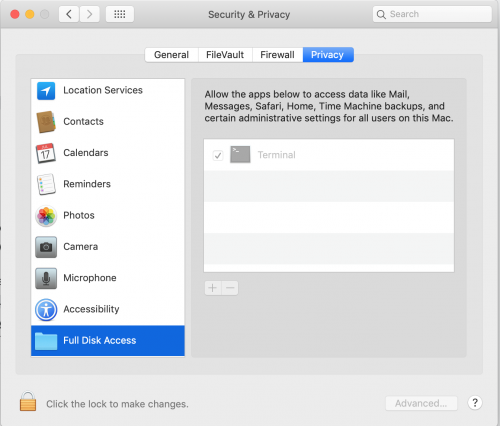
- Click the Apple menu and open System Preferences.
- Click "Security & Privacy," then click the "Privacy" tab.
- Click "Full Disk Access".
- Click the lock icon and enter your password to make changes. Then click the + button under the list of apps to add Terminal to the list.
- Click the lock icon again to save your changes. You should see Terminal in the list of allowed apps, as shown below.

Flash EOL Screen
If you see the Flash Player EOL information screen when you try to play a game, that means that SeaMonkey is loading your installed Flash Player plugin instead of the plugin that is bundled with Flashpoint. To fix the problem, uninstall Flash Player from your Mac and restart Flashpoint. Games should work again in SeaMonkey.
Flash Player Settings Popup
When you try to play a game, you might get a storage permissions popup like the one below:

If you are unable to close this window, follow these steps to solve the problem:
- Quit SeaMonkey if it is open (SeaMonkey -> Quit SeaMonkey from the top menu bar)
- Open Flashpoint Infinity's FPSoftware folder, then find and open "SeaMonkey.app".
- Copy and paste this URL into SeaMonkey's address bar:
https://www.macromedia.com/support/documentation/en/flashplayer/help/settings_manager03.html - You should see the Flash Player Settings Manager. Drag the bar all the way to the right to allow Flash to store "Unlimited" data. (Don't worry, Flashpoint games won't store more than a few MB of data.)
- Quit SeaMonkey (SeaMonkey -> Quit SeaMonkey from the top menu bar).
- Open Flashpoint again. The problem should be fixed.
MacOS Catalina (10.15) and later
Because Flashpoint's applications are from an "unidentified developer," if you're using Catalina or later, you'll need to approve each application before it can run. Open your system preferences, click "Security & Privacy", then allow each of the following applications to run: StartFlashpoint.command, Flashpoint Launcher, swfbbox, and SeaMonkey. If you have trouble figuring out how to do this, watch this tutorial video.
Because Adobe Director Projectors are 32-bit applications, SPR for Mac will not work on MacOS Catalina or later. This means that Flashpoint for Mac does not support Shockwave games on Catalina or later versions of MacOS.
MacOS Big Sur (11.0) and later
Flash applications have been successfully tested and are working. To use Flashpoint with Big Sur and later versions, a few modifications are required. Follow the steps below:
- Download SeaMonkey 2.53.4 for MacOS x64 from here. After the file finishes downloading, open it and copy the "SeaMonkey.app" file somewhere that you'll remember.
- Make sure you download the correct version; 2.53.4 is the only SeaMonkey version that will work with Flashpoint!
- Open Flashpoint Infinity's FPSoftware folder, then find the old "SeaMonkey.app" there.
- Right-click the old SeaMonkey.app and click "Show Package Contents."
- Open the
Contentsfolder, then within that folder, open theResourcesfolder. - Find the folder called
pluginsand copy it. - Find the new "SeaMonkey.app" file that you downloaded in Step 1. Right-click it and click "Show Package Contents."
- Open the
Contentsfolder, then within that folder, open theResourcesfolder. - Paste in the
pluginsfolder that you copied earlier. - Go back outside of the new "SeaMonkey.app" package and copy it.
- Open Flashpoint Infinity's FPSoftware folder, then paste the "SeaMonkey.app" file that you just copied. Replace the original file when prompted.
MacOS Monterey (12.0)
MacOS Monterey no longer ships with PHP, so you will need to manually install PHP 7.4. The instructions for doing so are below, but are currently untested. If you try them, please join our Discord server and let us know whether the instructions worked for you.
First, open the terminal and follow these instructions to install Homebrew. Keep the terminal open and run these commands in order:
brew tap shivammathur/php
brew install shivammathur/php/[email protected]
brew link --overwrite --force [email protected]
For more information about installing PHP on MacOS Monterey, see this article.
Apple Silicon Macs
To run Flashpoint on Macs with the new M1 chip, you'll need to install Rosetta by following these instructions. Once you've done that, follow the instructions in the previous sections to get Flashpoint working.
Installing Java
To add support for Java games, you'll need to install the Java Development Kit. Follow the steps below:
- Download JDK version 8u212 from here: https://github.com/frekele/oracle-java/releases/download/8u212-b10/jdk-8u212-macosx-x64.dmg
- Open the DMG file and run the installer. Follow the on-screen instructions to install the JDK.
Installing Wine
Running games in Wine is not yet supported, but we hope to add support for this in a future build. If you'd like to contribute to our efforts, you can learn more about installing Wine on MacOS from here.
Using Flashpoint with Automator (optional)
You can start Flashpoint without having to click on StartFlashpoint.command by using Automator using the below steps:
- Choose File > New.
- Select "Application", then click Choose.
- Drag the Run Shell Script action into your workflow.
- Enter
open /Users/[YOUR USERNAME HERE]/Downloads/Flashpoint\ Infinity\ for\ Mac\ Beta/StartFlashpoint.commandin the command field.
Technologies
Currently, only Flashpoint Infinity is available for Mac. However, it should be fairly simple to create a Flashpoint Ultimate package for MacOS as well. Let us know in our Discord if you can help!
No equivalent to the Flashpoint Proxy currently exists for MacOS. MacOS also does not provide any native way to set per-application proxy settings. In Flashpoint for Mac, the proxy settings for each supported technology must be set separately. This rules out using the Flash projectors, since they do not have configurable proxy settings. In Flashpoint for Mac, all Flash games run in a browser.
The Flashpoint FAQ contains a list of all web game technologies ("Platforms") supported in the Windows version of Flashpoint. The Mac version currently supports a small subset of these platforms. This is explained in detail below. The list of supported platforms includes an unscientific estimate of the percentage of games supported by our method.
Supported Platforms
- Flash: Supported using the SeaMonkey web browser, with a Flash plugin included. Games that use a Flash Player version other than 32 are not yet supported.
- ~95% of games supported.
- Shockwave: Supported with SPR for Mac. Because LeechProtectionRemovalHelp is only available for Windows, the majority of Shockwave games will not work properly.
- ~30% of games supported.
- Requires a 32-bit compatible OS; Catalina is not supported.
- HTML5: Supported using the SeaMonkey web browser. WebAssembly support is enabled in Flashpoint's SeaMonkey profile, so it should be compatible with nearly all of the same games as Basilisk.
- ~99% of games supported.
- Java Applets: Supported natively using the JDK. Java in the browser is not supported yet.
- ~99% of games supported.
Unsupported Platforms
- Unity Web Player: Has not been attempted yet. We would need to track down the Mac builds of all 12 versions of Unity Web Player that we support on Windows. Needless to say, this would be a huge challenge.
- PopCap Plugin: As far as we know, there is no version of PopCap Plugin for modern Macs.
- Authorware Web Player: Authorware is incompatible with all Intel Macs.
- GoBit Plugin: As far as we know, there is no version of GoBit Games Plugin for modern Macs.
- Silverlight: Silverlight for Mac is available here, but as explained in this StackExchange answer, Microsoft Silverlight for Mac is 32-bit only, even though the Windows version has 64-bit and 32-bit versions. This is a problem because no major browser for MacOS has a 32-bit version, and MacOS Catalina drops support for 32-bit programs entirely. As such, Silverlight is unusable on Mac.
- 3DVIA Player: As far as we know, there is no version of 3DVIA Player for modern Macs.
- 3D Groove GX: 3D Groove is incompatible with all Intel Macs.
- ActiveX: ActiveX is a Windows-only technology.
- ShiVa3D: The Windows version of the ShiVa3D Player is available in the free ShiVa Web Edition; this is where we obtained it. However, no Mac version of the ShiVa Web Edition is currently available, so we haven't been able to find a Mac version of the ShiVa3D Player. It's possible that we could extract a Mac version of the player from a Mac version of a ShiVa3D game. Or maybe we could obtain the Mac runtime from the Windows version of ShiVa3D Web Edition, since it has the capability of publishing for Mac.
Launcher Issues
A number of Flashpoint Launcher issues affect the experience of using Flashpoint Launcher on MacOS. Unfortunately, none of our Launcher developers currently have access to a Mac, so updates for the Mac version of Flashpoint Launcher will not be available in the foreseeable future. We will be unable to release a Mac version of Flashpoint 7.0 until a new version of the Launcher is built for MacOS. If you have access to MacOS and are able to build Flashpoint Launcher, please let us know!
The current issues with the Mac version of Flashpoint Launcher are listed below.
- Errors are shown in the log when services are missing from the
services.json. These services are unnecessary for Flashpoint on Mac, so the errors can be ignored. - Flashpoint Launcher cannot find its own Version file, even if it is present in the Launcher's folder and app package.
- The Theme dropdown menu on the Config tab does not work properly. To select a theme, you must manually type the path to the theme's CSS file.
- A popup appears if the user attempts to start a Windows executable from Flashpoint. This popup tells the user to install Wine, and points them to the Linux Support page, even though the Launcher is running on Mac.
- If a shell script is specified in
execs.jsonas an alternative to a batch script, the Launcher will attempt to launch the shell script defined for Linux, even if a different shell script is defined for Darwin (MacOS). - Flashpoint Launcher attempts to load the hidden resource forks of certain files as separate files. These files are not visible in the MacOS Finder, and have filenames beginning with
._.- If any Platform XML has a resource fork, all of the Platform XMLs will fail to load, causing a "No games found" error.
- If any localization JSON file has a resource fork, a "NotValidJSON" error will appear in the logs.
- When Wine is started from Flashpoint Launcher, it uses >70% CPU for several minutes without ever starting the intended executable. This is despite Wine working fine when started from the terminal. This issue needs to be investigated and solved before Flashpoint can support launching games through Wine.
- By default, Flashpoint Launcher will attempt to read and modify
config.jsonandpreferences.jsoninside its own app package. Since Mac applications are not allowed to modify their own app packages, this will fail. For this reason, Flashpoint Launcher must be opened with a shell script commandStartFlashpoint.command. This script sets the current directory to the Flashpoint Launcher folder so that the Launcher accesses theconfig.jsonandpreferences.jsonin the correct location. However, this unusual way of opening the Launcher may be the cause of the previously mentioned Wine bug.
Other Notes
- Some keyboard controls such as the spacebar or WASD keys may not work in some games. This is a known problem with the NPAPI Flash plugin on MacOS. We plan to resolve this problem in the next build of Flashpoint for Mac by using the PPAPI plugin instead.
- Flash games with URLs pointing to filenames with special characters will not work. This is because
nosamuEmbedSWF.shdoes not properly handle special characters when it converts URLs to paths, so it cannot copy the game's HTML to the correct location inhtdocs. - Some Shockwave games may not close when you quit them from the menu. If this occurs, click inside the Message Window next to the game. Then type
quitand press Enter to close the game. - Flashpoint for Mac uses exec mappings to determine what native executable to run based on the specified Windows application path. For example,
flashplayer_32_sa.exeis mapped tonosamuEmbedSWF.shfor MacOS. To add more exec mappings, navigate to Flashpoint'sDatafolder and openexecs.jsonin a text editor. The exec mappings use "darwin" to refer to MacOS. - Flashpoint for Mac uses
swfbboxto determine the width and height of an SWF file.swfbboxis part of theswftoolshomebrew package. To installswftools, first install homebrew. Then typebrew install swftoolsin the terminal. - Flashpoint for Mac requires that PHP and cURL are installed and enabled on your system. These components should already be set up, unless you are on MacOS Monterey.
Packaging Flashpoint for Mac
Here are some steps to keep in mind when packaging Flashpoint for Mac. This assumes that you are using the current package as a base and modifying it.
- You can follow these instructions to update Flashpoint's XMLs to the latest version.
- You can follow these instructions to update Flashpoint Router to the latest version.
- Use
update-spr.shin theFPSoftwarefolder to update SPR to the latest version. To get the latest version of SPR for Mac, see SPR for Mac. - If you would like to distribute a modified SeaMonkey profile, be sure to clear the cache, cookies, and other data. In SeaMonkey, click
Tools -> Clear Private Data. - If you would like to add a plugin to SeaMonkey, first install the plugin normally. Then, follow these steps:
- Navigate to
/Library/Internet Plug-Insin Finder and copy the files for the plugin you want to add. - Navigate to Flashpoint's
FPSoftwarefolder. Right-clickSeaMonkey.appand choose "Show Package Contents." - Inside the app package, navigate to
/Contents/Resources/plugins. Paste the plugin files that you copied in Step 1.
- Navigate to
- Before running or distributing Flashpoint, you should run the
dot_cleancommand inside the Flashpoint folder to remove resource forks. Flashpoint Launcher may not work properly if Flashpoint files have resource forks, as explained in Launcher Issues.